
SEO + GEO site audit: check your site for Google and AI engines
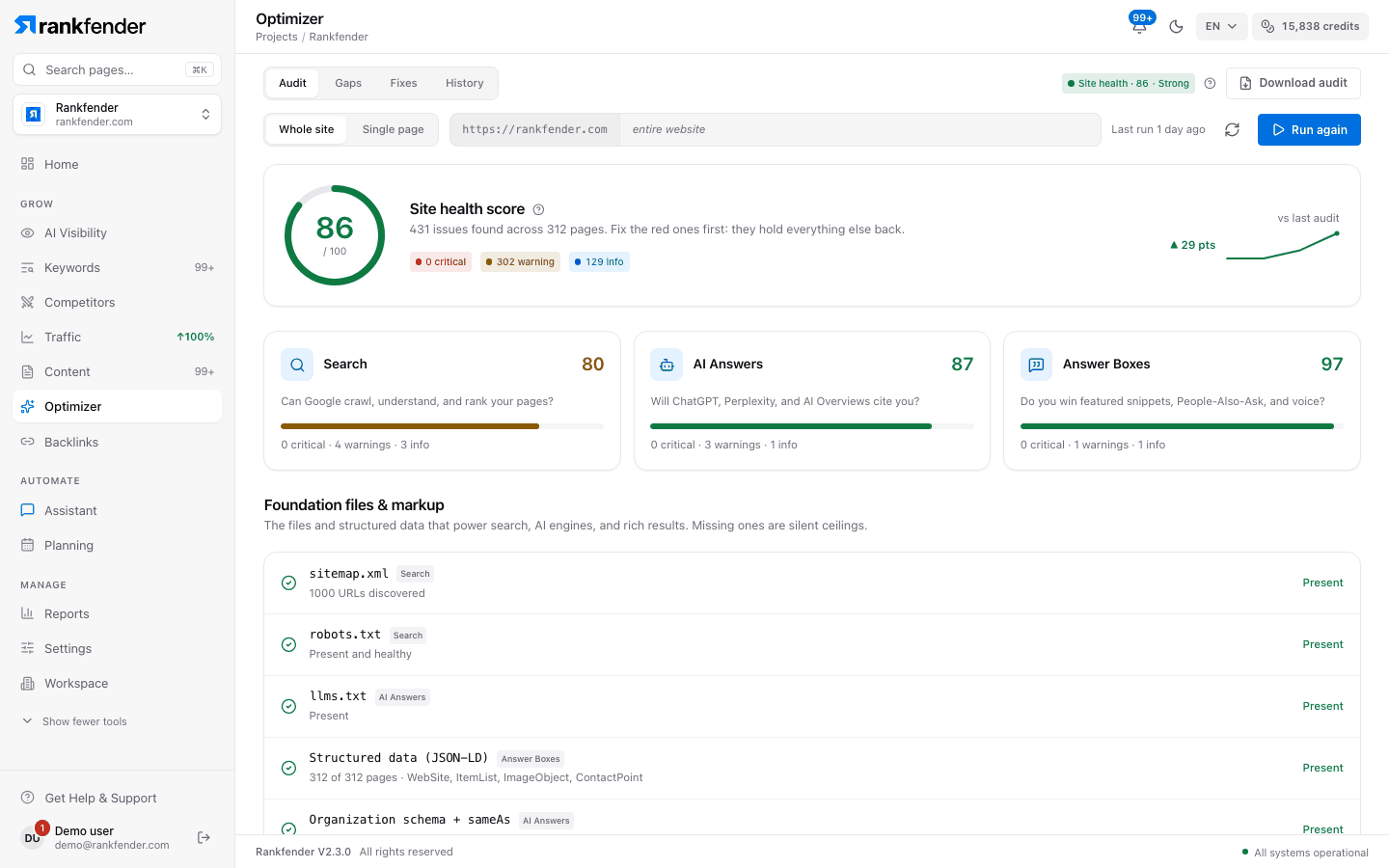
Rankfender crawls your site and runs about 60 checks in three pillars: Search (SEO), AI Answers (GEO) and Answer Boxes (AEO). You get one Site Health score, a fix list ranked by impact and a saved history of every audit.
Starts on Essential: $89 a month. Pages per audit: 10 on Essential, 50 on Professional, 500 on Business and Agencies.
What the audit checks
About 60 checks in three pillars. Every finding is marked critical, warning or info.
Search (SEO)
Can Google crawl, understand and rank your pages?
- Titles and meta descriptions: missing, too short, too long or duplicated
- H1 and heading order, image alt text, lang, hreflang and Open Graph
- Canonicals and noindex, including noindex pages listed in your sitemap
- robots.txt and sitemap.xml: missing, broken or redirecting
AI Answers (GEO)
Can AI assistants read your pages and trust them?
- AI crawlers allowed or blocked in robots.txt, and an llms.txt file
- Organization schema with sameAs links; authors with Person schema
- Clear, definition-style sentences that state what you do
- Trust signals: contact details, consistent address and phone, case studies, a trust page
Answer Boxes (AEO)
Can your pages win featured snippets and People Also Ask?
- A visible FAQ block on pages that answer buyer questions
- FAQ-style headings that are missing FAQPage schema
AI crawler access, llms.txt and structured data
AI assistants can only use pages their crawlers may read. The audit reads your robots.txt and reports, crawler by crawler, whether GPTBot, ClaudeBot, Google-Extended, Applebot-Extended, CCBot and other AI crawlers are allowed. It also checks that an llms.txt file exists.
Structured data is checked for eight schema types, including the required fields of each: Organization, LocalBusiness, Article, BlogPosting, FAQPage, BreadcrumbList, Product and SoftwareApplication.
Whole-site checks
Some problems only show when you look at the site as a whole. The audit follows your internal links and your sitemap to find them.
- Orphan pages that no other page links to, and pages it cannot reach
- Pages buried too many clicks from the homepage
- Broken internal links, dead-end pages and generic anchor text
- Duplicate titles and meta descriptions across pages
- Missing site sections, compared with a template for SaaS, local business or e-commerce sites
One Site Health score, and what changed since last time
The score blends the three pillars: Search counts for 45 %, AI Answers for 35 % and Answer Boxes for 20 %. If your homepage is set to noindex or robots.txt blocks every crawler, the score is capped at 20, because nothing else matters until that is fixed.
Every audit is saved. The next one shows what changed since your last audit and confirms each fix page by page.
A fix list ranked by impact
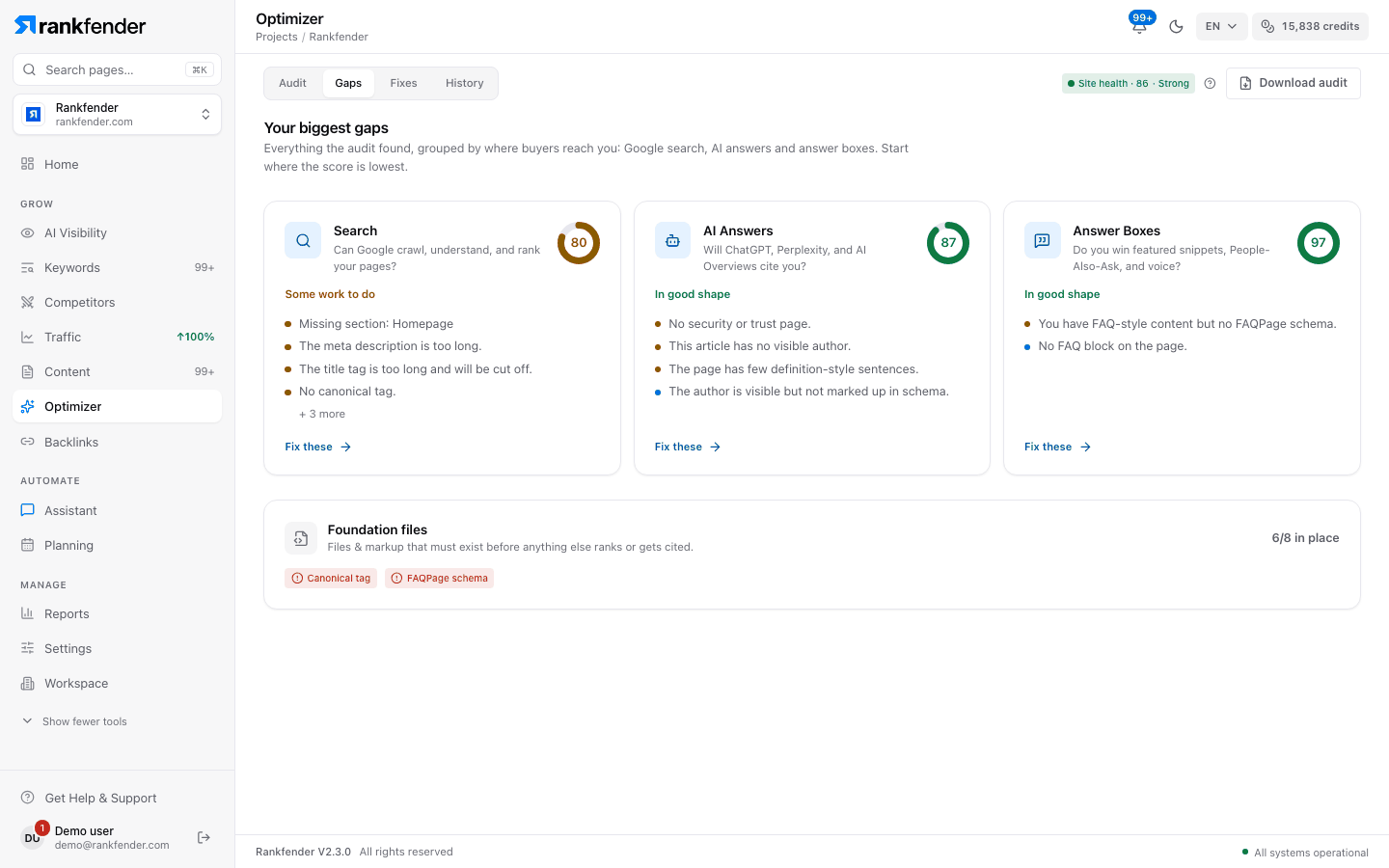
Fixes lists every issue in order of impact, with an estimate of the time it takes. Each one says what is wrong, why it matters and how to fix it. Add the ones you will do to your tasks: they land in Planning, scheduled for the next day.
Download the audit as a PDF to share it. Rankfender never changes your site by itself.
Pages per audit, by plan
| Plan | Pages per audit | Price |
|---|---|---|
| Essential | 10 | $89 a month |
| Professional | 50 | $199 a month |
| Business | 500 | $499 a month |
| Agencies | 500 | Custom |
Audit the whole site or a single page. Yearly billing is about 17 % cheaper.
Next to your Google data
Connect Google Search Console and GA4 (Professional and up) and the Traffic page adds a Health view: page speed, indexing status and sitemap health from Google. Core Web Vitals (LCP, INP and CLS) are reported only for sites connected to Search Console.
Free tools that preview the audit
Want a quick look first? These free tools run one part of the audit on any URL. The full audit runs them all, on every page your plan covers, and keeps the history.
Frequently asked questions
How many pages does one audit check?
Up to 10 pages on Essential, 50 on Professional and 500 on Business and Agencies. You can audit the whole site or a single page, and every audit is saved in History.
How is the Site Health score calculated?
It blends the three pillars: Search (SEO) 45 %, AI Answers (GEO) 35 % and Answer Boxes (AEO) 20 %. If your homepage is set to noindex or robots.txt blocks every crawler, the score is capped at 20.
What do GEO and AEO mean in the audit?
GEO checks whether AI assistants can read and trust your pages: crawler access, llms.txt, entity schema, authors and trust signals. AEO checks whether your pages can win answer boxes such as featured snippets and People Also Ask.
Does Rankfender fix my site automatically?
No. Each issue says what is wrong, why it matters and how to fix it. You add the fixes you choose to your tasks, and the next audit confirms them page by page.
Does the audit measure Core Web Vitals?
Only for sites connected to Google Search Console, which needs the Professional plan or higher. LCP, INP and CLS then come from your Google data.
Does the audit run JavaScript?
No. It reads the HTML your server returns. Content that only appears after scripts run is not checked, so keep titles, headings and schema in the HTML.
Can I share the audit?
Yes. Download it as a PDF from the Optimizer. In Reports, the full project audit puts the site audit, AI visibility and Google data in one PDF.
Run your first site audit
See your Site Health score, the checks that hold it back and the fixes to make first. Nothing needs connecting to start.